How do I add a warehouse?
A warehouse is where the ERP keeps the stock of your items. You need at least one so that sales and purchases move quantities. This explains how to create it, edit it and deactivate it.
What do I need before I start?
Nothing beforehand. The warehouse is independent master data: it is created before items and documents.
It is worth deciding two things in advance, though: which Code you are going to use and whether the warehouse will be active from day one. The code is short and is typed in documents, so a clear one (CENTRAL, TIENDA1) saves time later.
How do I do it?
- Go to Warehouse and click Warehouses.
- Click Add warehouse.
- Type the Warehouse code. If you leave it blank, the ERP generates a sequential one such as
ALM001. - Type the Warehouse name.
- Leave Level at
1unless you want another value. - Tick Active warehouse if you want to use it straight away.
- Click Save.
The warehouse appears in the list, sorted by code.
What does the warehouse list tell me?
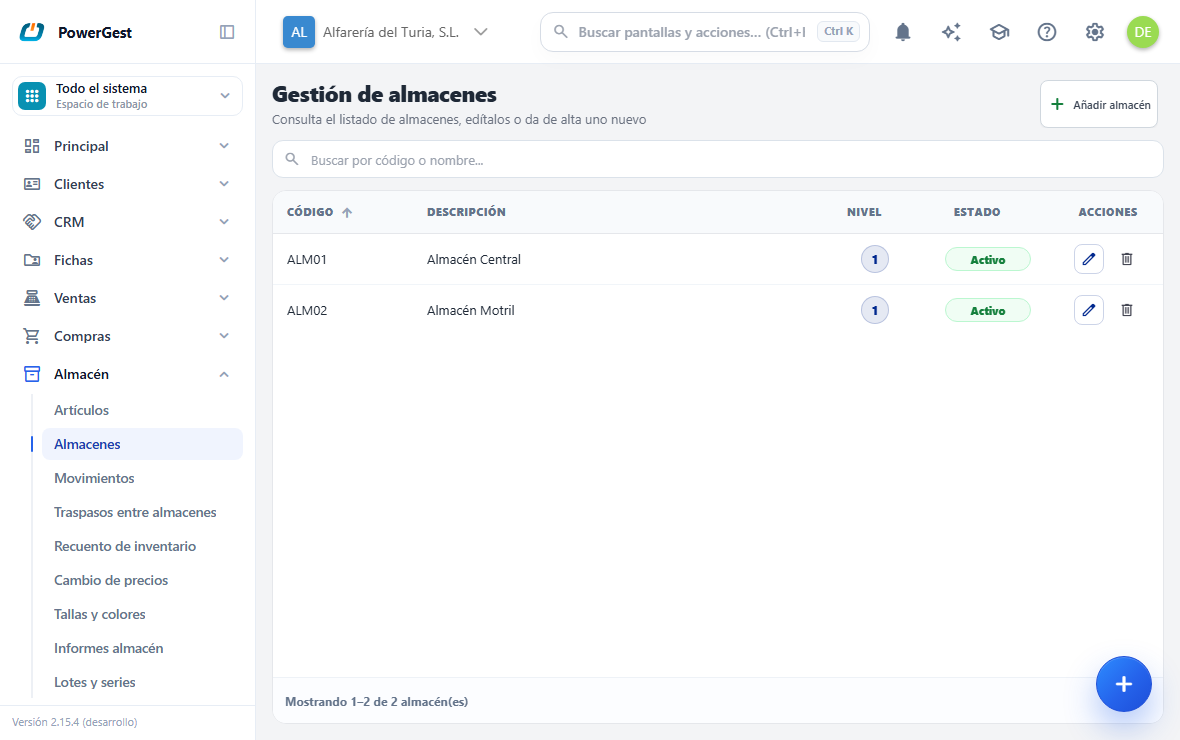
One row per warehouse: its Code, its Description, the Level and the Status, which says whether it can be chosen on a document. On the right, under Actions, that row's pencil and bin. Any header sorts the list when you click it.
How do I find one?
With the search box at the top, which looks at both the code and the description as you type. The foot of the list says how many you are seeing and, if they do not fit, turns pages.
How do I add one?
With Add warehouse, at the top right, which opens an empty window. You can leave the code blank: the ERP then puts a sequential one of the ALM001 kind.
What is the Level field for?
Level is a number that is saved with the warehouse and shown on its row in the list. It is for sorting and classifying the list when you have many warehouses.
It doesn’t change how the ERP behaves: it doesn’t restrict which items come in, it doesn’t create a hierarchy of warehouses and it doesn’t affect any stock calculation.
How do I change a warehouse’s details?
Click the pencil icon on its row. The same form opens with the details loaded and the title Edit warehouse.
You can change the code, the name, the level and the status. If you leave the code blank, the one it had is kept. Two warehouses can’t share a code: if you repeat it, you will see A warehouse with code ‘…’ already exists.
Changes affect everything that already points to that warehouse: items, stock and documents. Changing the name doesn’t move any quantity.
Which warehouse do invoices and orders start with?
When you create a document, the ERP gives it a warehouse without you having to type it. You can change it in the header whenever you like.
Which one it chooses depends on how many active warehouses you have:
- If you have only one, it uses that one. There is nothing to set up.
- If you have several, it uses the one you have set in Settings → Warehouse and production → Warehouse, in the Default warehouse for documents field. You type the warehouse code, the same one you type on the lines.
- If you have several and haven’t set one, the document can’t start with a warehouse and the ERP warns you so that you set it up.
That last case is best sorted out as soon as possible: a document without a warehouse looks normal while you are writing it, but it can’t be saved as soon as it has a line that moves stock.
When you save the settings, the code is checked to make sure it exists and is active. If you mistype it, you are told at that moment instead of it failing later when you invoice.
What happens if I deactivate a warehouse?
A deactivated warehouse disappears from the selectors: it can’t be chosen when creating an item or when making a document.
What was already done isn’t touched. Its stock is still there, its past stock movements can still be viewed and the documents that used it still point to it.
Deactivating is the right way to retire a warehouse you no longer use but that has history. To use it again, edit it and tick Active warehouse.
Can I delete a warehouse?
Yes, with the bin icon on its row. You are asked to confirm in the Delete warehouse window.
Deleting is permanent and is only allowed if the warehouse is clean. If it has stock or associated stock movements, the ERP prevents it and shows A warehouse with stock or associated stock movements cannot be deleted.
When that happens, what you want is to deactivate it, not delete it: deleting it would leave the history of the documents that used it without an owner.
If something goes wrong
| What you see | What has happened | What to do |
|---|---|---|
| ‘A warehouse with code ‘…’ already exists.’ | Another warehouse uses that code | Choose another code, or leave the field empty so one is generated automatically |
| ‘The warehouse code cannot be empty.’ | The code was left blank when editing | Type a code, or leave it empty again from the add form |
| ‘The warehouse name cannot be empty.’ | The name is missing | Type the Warehouse name |
| ‘A warehouse with stock or associated stock movements cannot be deleted.’ | The warehouse has history | Untick Active warehouse instead of deleting it |
| ‘The specified warehouse does not exist.’ | Someone else deleted it while you were editing it | Go back to the list and reload |
| The warehouse doesn’t appear when making an invoice | It is deactivated | Edit it and tick Active warehouse |
| ‘No default warehouse is configured and there is more than one active warehouse.’ | You have several warehouses and none marked as the usual one. Setup sets it to the first one, so this only happens if it was removed by hand or the warehouses were created some other way | Enter its code in Settings → Warehouse and production → Warehouse, Default warehouse for documents field |
| ‘The default warehouse ‘…’ does not exist.’ when saving the settings | The code is mistyped, or that warehouse no longer exists | Correct it. Until you do, no other settings change is saved |
| ‘The default warehouse ‘…’ is deactivated’ | The chosen warehouse is deactivated | Activate it, or choose another code |
| ‘Line N affects stock but has no warehouse.’ when saving | The document was left without a warehouse in the header | Set it in the header. If it happens to you often, set up the default warehouse |
See also: View and correct an item’s stock · Move stock between warehouses · Run the stock report
More about Warehouse
- How do I raise or lower the prices of many items at once?
- How do I view and correct an item’s stock?
- How do I count the warehouse and balance the stock?
- Managing the warehouse
- What batch and traceability reports do I have?
- How do I move stock from one warehouse to another?
- How do I run the stock report?
- How do I follow the traceability of a batch or a serial number?
- How do I work with batches and expiry dates?
- How do I work with serial numbers?
- How do I work with sizes and colours?