How do I open a new financial year?
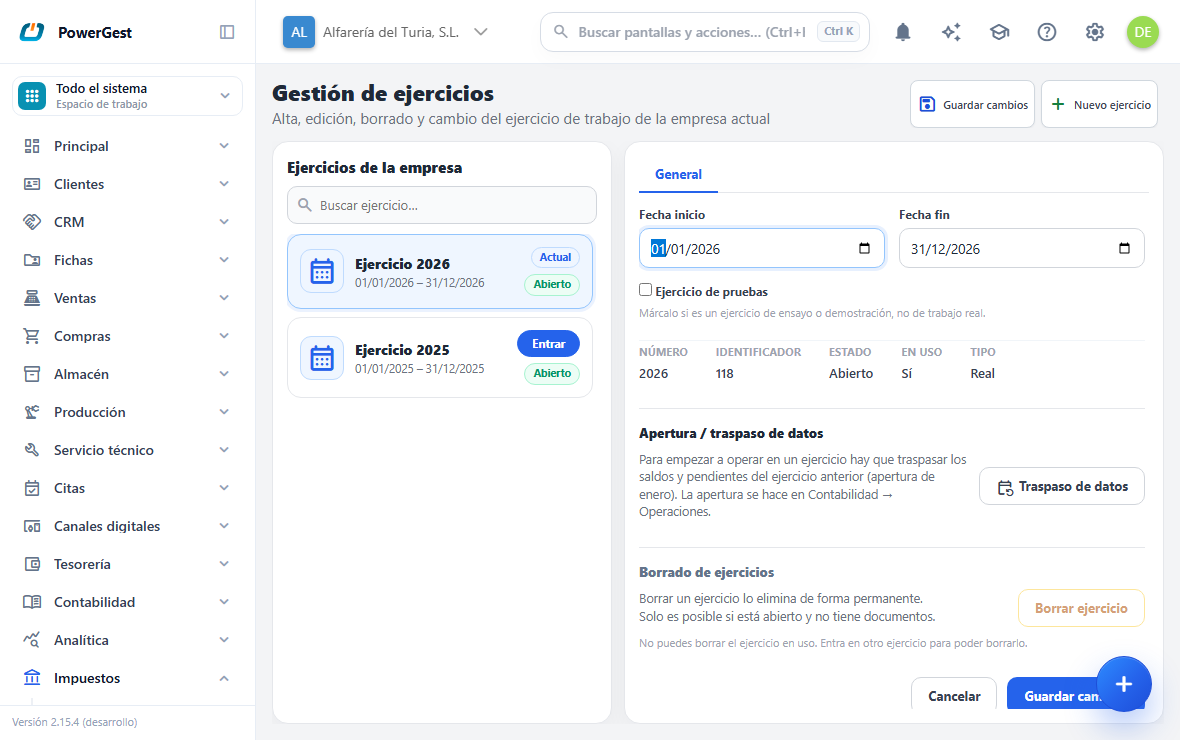
When a year starts, you have to create its financial year in each company. Creating it only opens the time frame: it starts out empty. Carrying over last year’s balances is a separate step, in Accounting.
What do I need before I start?
You have to be inside the company in which you want to open the financial year. The financial year is created in the current company and only in that one. If you run several companies, repeat the process in each.
It is worth knowing which financial years already exist and what dates they cover. The program won’t let you create two financial years with the same number or with overlapping dates.
How do I create the financial year?
- Click the company name, at the top of the left-hand panel.
- Choose Financial years.
- Click New financial year in the header. If the window is narrow, the button is inside the ··· menu.
- Check the Number. The program suggests the next one after the highest that already exists.
- Check Start date and End date. If the number is a year, the program fills in the whole calendar year. Change them if your financial year doesn’t run from January to December.
- Tick Test financial year only if it is a trial run and you aren’t going to work in it for real.
- Click Create financial year.
The financial year appears in the list with the Open label. You aren’t inside it yet: to enter, click Enter on its row.
What happens when I create it?
The financial year starts out empty. It has no documents, no journal entries and no balances. It is a time frame, nothing more.
What does not change when you create it:
- Nothing is carried over from the previous financial year.
- The customers, suppliers, items, price lists and warehouses are still the same: they belong to the company, not to the financial year.
- The financial year you were working in stays the same until you click Enter.
Can I use a period that isn’t the calendar year?
Yes. Start date and End date are free. A financial year from 1 April to 31 March of the following year is valid.
The only condition is that it doesn’t overlap with another financial year of the same company. If the dates overlap another financial year, the program warns you and doesn’t create it.
The Number is the financial year’s identity within the company and can’t be changed later. Choose it carefully: the dates can be corrected later, the number can’t.
What is the point of marking a financial year as a test one?
Ticking Test financial year labels the financial year as a trial run or demonstration. In the list it appears with the Test label.
It is only a visual marker. It doesn’t change anything you can do inside: you invoice, post to the accounts and delete just as in a real financial year.
Its use is to avoid confusion when someone cleans up data. Seeing the Test label before deleting makes it clear that it isn’t live business data.
The mark is set when you create the financial year. If you later go into its record and click Save changes, check that the Test financial year checkbox is still ticked before saving.
How do I carry over the balances from the previous financial year?
Balances aren’t carried over on their own. The carry-forward is done from Accounting operations, and it requires the previous financial year to be closed.
- Close the previous financial year with Close financial year.
- Click Open with the new year. The program generates the opening entry as a mirror of the closing entry.
- If you work with batches or serial numbers, also click Open stock.
From Financial years you get to that screen with the Data carry-forward button. Repeating the opening doesn’t duplicate it, and there is an option to undo it if something needs correcting.
If something goes wrong
| What you see | What has happened | What to do |
|---|---|---|
| ‘Financial year … already exists in the company.’ | That number is already used in this company | Check the list. If you were after another year, change the Number |
| ‘The dates overlap with another financial year of the company.’ | The period overlaps another financial year | Adjust Start date and End date |
| ‘The end date must be after the start date.’ | The dates are the wrong way round | Correct them |
| ‘No company selected.’ | The session was left without a current company | Enter a company again from Switch account |
| The new financial year comes up empty | That is expected: it starts out with no data | Do the carry-forward from Accounting operations |
See also: Switch financial year · Delete a financial year
More about Companies
- How do I delete a financial year?
- How do I switch financial year?
- How do I switch company?
- How do I change my password?
- How do I subscribe to or change my plan?
- How do I back up my company and restore it?
- How do I add another company?
- How do I get started with Powergest?
- Where do I change my company details?
- How do I delete my account?
- Companies and financial years
- How do I set up my company?