How do I add a ledger account?
The chart of accounts fills itself in: each account is created the first time someone uses it. Adding one by hand is for giving it a name before using it, or for getting the sub-account for a new item ready.
What account codes does the program accept?
An account code is digits only, and the only thing that decides what each account is is how many digits it has:
- Sub-account: exactly 8 digits. For example
43000025. It is the one that receives the journal lines. - Grouping account: any shorter code. For example
4,43,430or4300. It adds up what is below it and is used to see totals. It doesn’t accept direct journal lines.
There are as many grouping levels as digits, and that is on purpose: the line items of the trial balance and of the annual accounts group some by 2 digits and others by 4.
So you don’t have to type zeros there is a shorthand with a dot: what goes before the dot stays at the front, what goes after it is stuck on the end and the gap is filled with zeros up to 8. So 430.25 becomes 43000025, and 700.1 becomes 70000001. The shorthand always produces a sub-account.
The sub-account length is a company setting and can be seen in Settings → Accounting, in ‘Account code format’. If in your installation it is 10 digits instead of 8, everything above still applies with the number changed.
How do I do it?
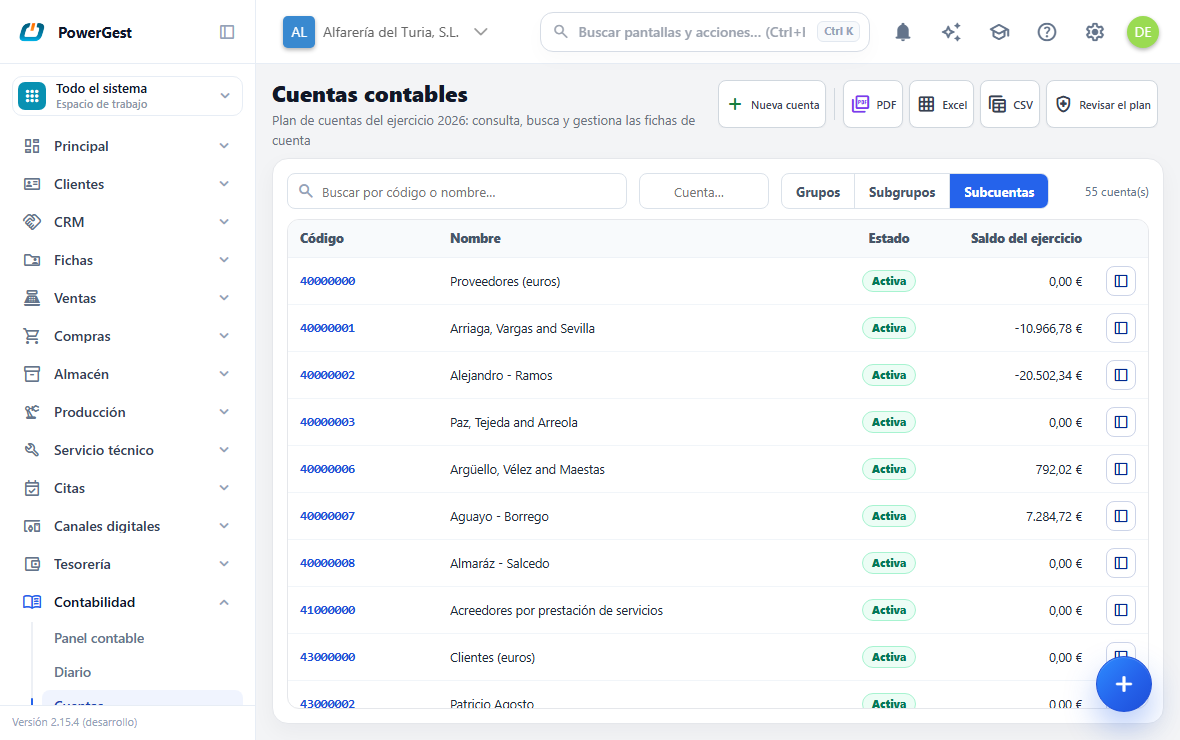
- Go to Accounting and then Accounts. The Ledger accounts screen opens.
- Click New account, at the top right. A window opens.
- Type the Code. A short code (
43,430,4300) creates a grouping account; a full one (43000025) or the shorthand with a dot (430.25) creates a sub-account. - Type the account’s Name.
- Click Save. If something doesn’t add up, the window stays open with what you typed and tells you the reason.
The new account can be used from that moment. It appears in the list within its level: if you have created a grouping account and you have Sub-accounts ticked, change to Subgroups to see it. If you change your mind before creating it, click Cancel in the window.
This is adding, not editing: if the code already exists, the program rejects it. To change an account that already exists, open its record from the list.
What happens when I add an account?
In the list you will see it under its level —Sub-accounts if it accepts direct journal lines; Subgroups or Groups if it only groups— and with the Status Active. The level is decided by the length of the code you typed, and it can’t be changed afterwards: to go from one to another you add the correct code.
The program hangs it from its group account by itself. It looks for the longest prefix that already exists: if you create 43000025 and 430 exists, the new one hangs from 430. That is why the balance of 430 includes the new account’s from the very first moment, without you having to link anything.
Adding an account doesn’t move any balance. It starts at zero.
Do I have to create the accounts before posting?
No. If you type an account that doesn’t exist in a journal entry in the Accounting journal, it is created when you save. While you type it you will see the mark new · will be created on save.
The same happens with the journal entries that an issued invoice creates: the accounts it needs are created by themselves the first time.
The difference is the name. An account created on the fly keeps its own code as its name. Adding it from Accounts is the way to give it, from the start, the name you want to see in the general ledger and in the reports.
What does the ‘Group with journal lines’ warning mean?
Some accounts in the list appear with the Group with journal lines label and at the top the warning There are group accounts with direct journal lines (to be cleaned up) appears.
It means that a grouping account, for example 700, is receiving journal lines directly, instead of its sub-accounts receiving them. It is old data: today the program prevents it.
It is a warning, not an error. It doesn’t stop you doing anything, but it is worth knowing what it means: the amount of that journal line counts both in the grouping account and at the sub-account level, so a grouped total and the same total in detail don’t match. It is fixed by reposting those journal lines against the sub-account they belong to.
What you shouldn’t do is change the default accounts in the settings so that they have 8 digits. They are written short on purpose —‘the sales account is 700’ is how people say it— and the program takes them down to their sub-account by itself when posting.
Why doesn’t the account search offer me the same accounts on every screen?
Because not all screens ask for the same thing, and that is on purpose.
- Here, in Accounts, you see all of them: grouping accounts and sub-accounts, each at its level (Groups, Subgroups, Sub-accounts). This is the complete chart of accounts, and grouping accounts are part of it —they are the ones that group and give totals, and the ones that name the rows of the trial balance when you ask for it broken down—.
- On the management screens —the customer record, the supplier record, a treasury account record— the magnifier offers only active sub-accounts. There you are choosing an account to receive journal lines, and a group doesn’t accept them: offering it would be offering something that is going to fail.
If you look for a group and it doesn’t appear, it isn’t blocked or deleted: it is just that that screen can’t use it.
If something goes wrong
| What you see | What has happened | What to do |
|---|---|---|
| ‘The account code only allows digits’ | You have typed letters or more than one dot | Digits only and, at most, one dot |
| ‘… exceeds the sub-account length’ | The code has more than 8 digits | Shorten it: 8 is the maximum |
| ‘… doesn’t fit in an 8-digit sub-account’ | The shorthand is too long | Shorten the prefix or the rest |
| ‘Account … already exists’ | The code is already in the chart | Find it in the list and open its record to edit it |
| ‘The account name is required’ | You have left the Name blank | Type a name |
| You create a grouping account and then it won’t let you post to it | That is correct: a grouping account adds up its sub-accounts and doesn’t receive journal lines | Add the full sub-account and post to it |
What if I see two almost identical accounts with the balance split between them?
If you see 570000 and 57000000, or any pair like that, with the balance split between the two, it is a chart that was left half-done: in older installations the default chart came with a different length from the one configured, and when posting a new account was created instead of using the one that was already there.
Click Review the chart on this same screen. It will tell you which accounts don’t fit and how many journal lines each one has, which is what you need to know which one is the right one. The ones that have no journal lines can be removed in one go with the button that appears below.
The ones that do have movements aren’t touched automatically, and that is deliberate: merging them moves amounts that have already been posted. That is your decision, account by account.
How do I write the account on older records?
When you add a customer, a supplier or a sales agent, their account is opened and written on the record. Records added before it worked this way may have the Account field empty: the accounts use the one from their code, but it isn’t shown written on the record.
Click Review the chart. Below the report you will see how many records don’t have the account written and how many of them already have their account in the chart. With Write the account to N record(s) the account each one already uses is written on it. No new account is opened and no journal line is moved.
Those that don’t have an account in the chart yet (nothing of theirs has ever been posted) stay as they are and keep using the one from their code. Nor is it written on a record with two accounts of its own in the chart: deciding which one is valid is deciding where its balance goes, and you do that from its record.
See also: View an account’s general ledger · Make a manual journal entry
More about Accounting
- How do I depreciate fixed assets?
- How do I find a journal entry and correct it?
- How do I close and open the financial year?
- How do I view an account’s general ledger?
- How do I define the line items of the balance sheet and the income statement?
- How do I make a manual journal entry?
- How do I print or export what I see in accounting?
- How do I assign costs by department and by project?
- Keeping the accounts
- How do I write the notes to the annual accounts?
- What is the accounting dashboard?
- How do I allocate indirect costs?