How do I teach the assistant about my company?
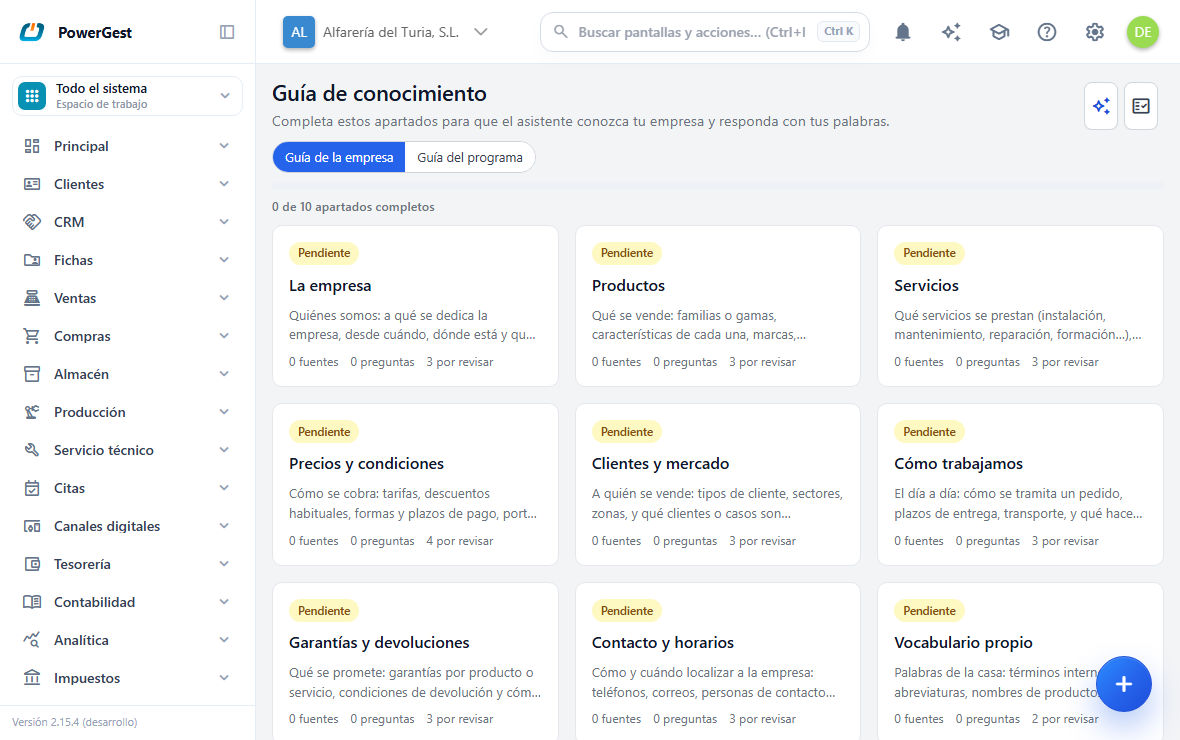
The knowledge guide is where you write down what the assistant can’t know on its own: what you sell, how you work, what terms you offer. You get there through Settings → Knowledge guide.
What do I need before I start?
Nothing installed, but you do need an idea of what you want the assistant to answer. The best return comes from starting with the questions customers ask you most.
You need permission for the screen. If you don’t see it in Settings, ask whoever administers the ERP.
The work is done once and then kept up to date. It isn’t a daily task.
How is the guide organised?
In sections. The first time you go in they are created automatically, with names such as The company, Products, Services, Prices and terms, Warranties and returns, Our own vocabulary or Frequently asked questions.
Each section shows a status and what it contains:
| Status | What it means |
|---|---|
| Outstanding | Empty, nobody has written anything |
| Started | It has something, but it can be expanded |
| With notes | The artificial intelligence has flagged something that is missing or doesn’t fit |
| Full | Enough to answer |
At the top you can see the overall progress: N of M sections complete.
Sections you don’t need can be hidden with Hide section, and brought back later from Hidden sections….
How do I write the content of a section?
Click the section’s card to open its record. Inside there are two parts, and they are for different things.
Texts in this section. Free-form explanations: your returns policy, how your shipping works, what product range you have. Click Add text, fill in Title and Content, choose who it is for (For everyone, For technicians, For developers) and click Save.
Questions and answers. Pairs of a literal question and an official answer: ‘Do you ship to the Canary Islands?’ → ‘Yes, with a surcharge of…’. Click Add question and answer.
Questions and answers take precedence over everything else. When one matches what is being asked, the assistant answers with it and in its tone. It is the most direct way to set an answer.
When you save, the text shows as Pending indexing for a few seconds and then changes to Indexed. Until it is indexed, the assistant doesn’t use it. The screen refreshes on its own.
What is asking the artificial intelligence for a review for?
So that it tells you what is missing, instead of you staring at a blank screen.
Click Request AI review on the board, or Review this section inside a record. After a moment AI suggestions appear, each with its type: Missing information, Poorly explained, Contradiction, Unanswered question or Unnecessary content.
Each suggestion has three buttons:
- Reply: a box opens for you to write your company’s answer right there.
- Already resolved: if you already covered it somewhere else.
- Discard: if it doesn’t apply.
This review uses the basic engine, which uses very few credits; if your company has its own AI engine, it uses none. It also runs automatically at night for companies that have changed something, at most once a day.
It can also suggest new sections, in the Artificial intelligence suggests these sections block, with the Add and No, thanks buttons.
Separately there is the in-depth review, which does use credits and says so first: ‘Cost: N credits. Nothing is charged until you press the button.’ You start it with Request in-depth review.
How do I know if the guide is working?
With the Check the guide button. The program takes the questions you have recorded and checks whether the assistant finds them.
The result comes out as a guide health percentage, with the detail: ‘The assistant finds the right answer in X of Y recorded questions.’
Below it a second sentence appears, and it is the one most worth reading:
- ‘And it avoids answering when it does not know.’ is the good one.
- ‘Warning: it might answer questions your guide does not cover.’ warns you that the assistant answers too readily.
The check is started by hand because it takes some work. The last result is kept with its date.
Cases that come up often
Can I upload a file instead of writing?
Yes, but it is on another screen. From a section’s record, the Advanced management link takes you to AI knowledge base, where you upload files with Add files (PDF, TXT, MD).
It accepts PDF, TXT and MD, up to 50 files per batch. It doesn’t accept Word, Excel or images, and a scanned PDF without text is rejected because there is nothing to read.
What happens to texts without a section?
Files uploaded through the advanced route may end up unclassified. They appear in a separate section, with a Choose a section… drop-down and the Classify button to put them in place.
Can I write things just for technicians?
Yes: that is what the Who is this content for? selector does. A text marked For technicians isn’t shown to someone asking as a normal user.
If something goes wrong
| What you see | What has happened | What to do |
|---|---|---|
| A text has been in Pending indexing for a long time | The indexing process is running late | Wait; if it doesn’t change, tell support |
| Indexing error on a source | The file or the text couldn’t be processed | Click Re-index; if it persists, check the file |
| ‘The file contains no extractable text.’ | Scanned PDF, with no text layer | Upload it as TXT, or type the content by hand |
| ‘Format not supported…’ | It isn’t PDF, TXT or MD | Convert it |
| ‘The review could not be requested.’ | The artificial intelligence engine isn’t responding | Try again later |
| ‘No questions to check yet.’ | The guide has no indexed questions and answers | Add some before checking |
| The assistant still isn’t using what I wrote | The text isn’t Indexed yet, or you are in another company | Check the status and the active company |
See also: What the assistant knows and what it doesn’t · Ask the assistant something
More about Assistant
- Can I attach a CSV or a spreadsheet for the assistant?
- Can I show the assistant an image or a PDF?
- How do I add several items at once with the assistant?
- How do I choose how much effort the assistant makes?
- Working with the assistant
- How do I ask for a professional analysis and what does it cost me?
- How do I ask the assistant to do something in the ERP?
- How do I put the assistant on my website?
- How do I ask the assistant something?
- Test the assistant and find out what it costs
- Can I tell the assistant to stop asking me about the professional analysis?
- What does the assistant know and what doesn’t it?