How do I count the warehouse and balance the stock?
You count what is really on the shelves, enter it in Stock count and the program sets the stock to what you counted. This is what is called a stock adjustment.
What do I need before I start?
You need the warehouse you are going to count to be added and active, and edit permission on Warehouse. Without that permission the screen won’t let you apply the count.
Items with traceability by batch or by serial number aren’t counted here. Their quantity only moves with stock-in or stock-out documents, so as not to break the traceability chain. If you enter one, the line is marked in red with the reason and the stock count can’t be applied until you remove it.
How do I do it?
- Go to Warehouse → Stock count.
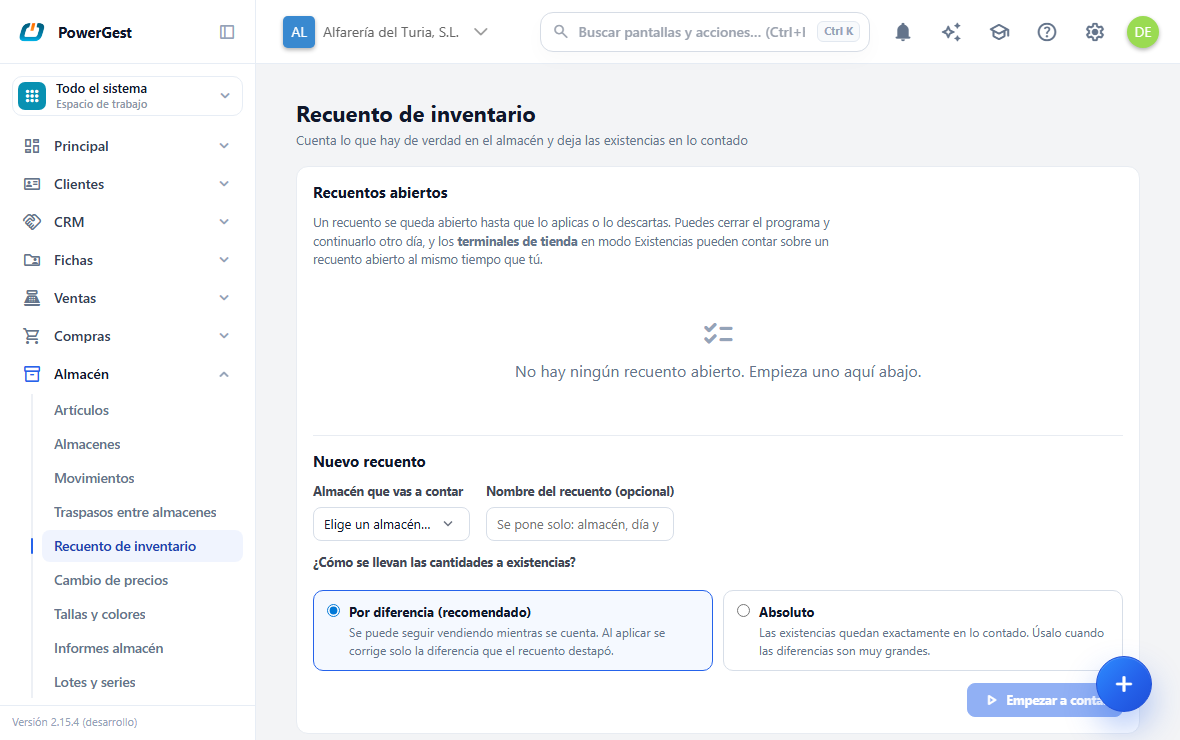
- Choose the warehouse you are going to count.
- Give it a stock count name if you want to tell it apart from others. If you leave it empty, it is filled in automatically with the warehouse, the day and the time.
- Choose how the quantities will be taken to stock: By difference (recommended) or Absolute. The next section explains how they differ.
- Click Start counting.
- Click Add line and type the item’s code. The name and the stock the program has are filled in automatically.
- Type in Counted what you have really counted. The Difference column tells you how much is over (in green) or how much is missing (in red).
- Repeat with all the items you have counted.
- Click Apply stock count.
When you apply it, the program tells you how many lines it has adjusted and the detail of each one: what there was, what is left and the difference.
What do I see when I come in?
At the top, the Open stock counts: the ones somebody started and that have not been applied or discarded yet, with their warehouse, their mode, when it was opened and how many lines it has. If there are none, it tells you and sends you down, which is where one is started.
How do I start one?
You fill in the block below (the warehouse you are going to count, a name if you want to tell it apart and how the quantities will be taken to stock) and click Start counting. The screen changes to the counting one, with its line table empty.
What is the difference between by difference and absolute?
It is the decision you make when you start the stock count, and it changes what happens to whatever is sold or received while you count.
By difference is the normal mode and the recommended one. You can keep selling while you count. When you apply it, the program corrects only the difference the count uncovered: if you counted 8 where 10 were recorded, it takes 2 off whatever there is at that moment. What was sold between counting and applying is kept.
Absolute sets the stock to exactly what you counted, whatever happens in the meantime. It is for when the differences are so large that the program’s figure isn’t even useful as a reference. With this mode there must be no sales or incoming stock between counting and applying: anything that moves in between is lost. The screen warns you when you choose it and while you count.
The header of the stock column reminds you what the counted quantity is compared against: Stock when counted in a by-difference count, Stock now in an absolute one.
Can I leave the stock count half done and carry on another day?
Yes. A stock count stays open until you apply it or discard it, and what you count is saved as you type it. You can close the program, switch off the computer or lose your connection: when you come back, the stock count is where you left it.
When you go into Stock count you see the list of Open stock counts, with their warehouse, their mode, when they were opened and how many lines they have. Click Continue on the one you want to pick up.
While you are counting, Back to the list takes you back to that screen without closing anything: the stock count stays open and you can continue it whenever you like.
Can several people count at the same time?
Yes. Store terminals in Stock mode count on an open stock count at the same time as you. What they scan appears on your screen on its own within a few seconds, without you having to reload anything.
The Counted by column tells you who made each reading from a terminal. Lines you have counted yourself on this screen leave it empty.
The same item is counted on a single line. If someone counts it from a terminal just while you are typing its quantity, the program warns you and shows you what is really there so you can check it.
How do I close a stock count without touching the stock?
Click Discard stock count while you have it on screen and confirm. The stock count is closed without moving a single unit: what was counted is kept for reference, but it can no longer be applied and nobody can carry on counting in it.
This is what you do with a stock count that was started by mistake, or with one that was left half done and is no longer valid because the warehouse has changed since then.
What do I need to know to avoid a nasty surprise?
A line with no counted quantity doesn’t count as zero. If you leave the Counted field empty, that line is ignored: the program understands that you haven’t counted it yet, not that there is nothing left. To say there is nothing left, type 0.
Either everything is applied or nothing is. If something fails, no line is adjusted. You are never left with half the warehouse balanced without knowing which half.
The same item can’t be counted twice in the same stock count. If you repeat it, the program rejects it so that there aren’t two different figures for the same place.
A stock count is applied only once. When you apply it, it is closed, and you go back to the list of open stock counts with the detail of what was adjusted in view.
In a by-difference stock count, if a lot has been sold since you counted, a line may end up negative. The program applies nothing and tells you which one it is: count that item again.
Can I ask the assistant to do it?
Yes. The assistant has the stock adjustment action and accepts several lines at once, with the same meaning: the quantity you give it is what you counted, not an adjustment. Like every action that changes data, it summarises it for you and asks you to confirm before carrying it out.
The difference from the screen: the assistant applies what it can and tells you which lines failed; the screen applies nothing if any line can’t be applied.
How is this different from correcting an item’s stock?
Correcting an item’s record is for one item you know is wrong. The stock count is for counting the warehouse: many items in one go, seeing the difference for each one before touching anything.
See also: view and correct an item’s stock and move stock between warehouses.
More about Warehouse
- How do I raise or lower the prices of many items at once?
- How do I view and correct an item’s stock?
- How do I add a warehouse?
- Managing the warehouse
- What batch and traceability reports do I have?
- How do I move stock from one warehouse to another?
- How do I run the stock report?
- How do I follow the traceability of a batch or a serial number?
- How do I work with batches and expiry dates?
- How do I work with serial numbers?
- How do I work with sizes and colours?