How do I create a purchase document?
The four purchase documents —supplier quote, purchase order, goods receipt with delivery note and purchase invoice— are created with the same screen. The title changes and little else. What does change a lot is the moment the document starts to take effect: some take effect when you Save and others only when you issue.
What does the purchase invoice list tell me?
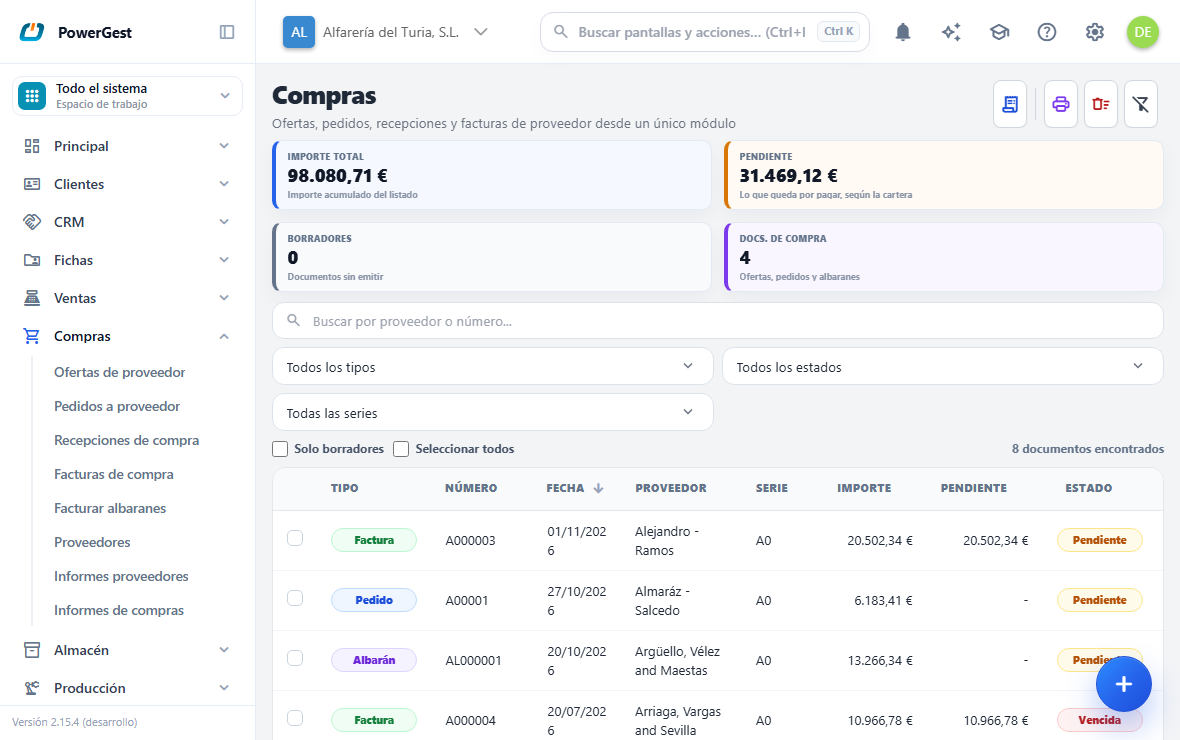
One row per invoice: its Number, the Date, the Supplier, the Series, the Amount, what is still Outstanding to pay and the Status, which goes from draft to pending payment and to paid. If the company distinguishes overdue items, the one past its date says overdue.
What are the four figures at the top?
They sum up what you are looking at with the filters you have set, not all of your purchases: the Total amount of the list, what is still Outstanding to pay according to the payables ledger, how many Drafts are waiting to be issued and how many Purchase docs are quotes, orders or delivery notes.
How do I record an invoice I have received?
With New invoice, at the top right. If the goods already came in with a receipt, it is better to invoice that receipt: the lines come across by themselves and the warehouse is not moved twice.
How do I find one?
With the search box, which looks at the supplier and at the document number. The drop-downs next to it narrow by status and by series.
How do I keep only the ones I still have to issue?
With the Drafts only checkbox, just above the list: it leaves in view only the invoices that are still unissued, which are the ones you can touch. Next to it, Select all ticks in one go the ones in the list that accept a bulk action.
Can I print or delete several at once?
Printing sends a whole range of invoices to the printer, and Bulk delete deletes by range the ones that are still drafts: an issued purchase invoice is not deleted, it is credited.
What do I need before I start?
You need the supplier set up, with its payment method. The invoice’s payment instalments come from the payment method.
You also need the warehouse the goods go into, if the document moves stock. A goods receipt with delivery note and a purchase invoice add to the warehouse; a quote and an order don’t.
It is best to have the items set up. If you buy a one-off thing that isn’t in your file, you can type the description by hand on the line.
How do I do it?
- Go to Purchases and choose in the menu the type you want to create.
- Click the button in the corner: New invoice, New goods receipt, New order or New quote. When you hover over it, the button shows the full name.
- In Purchase details, type the Supplier code and press Enter. If you don’t know it, type part of the name and choose from the list, or click the magnifying glass to search with more criteria.
- Check the Date and the Warehouse.
- If it is an invoice, type in Supplier invoice no. the number on the supplier’s invoice.
- Add the lines: item code and quantity. The price is suggested automatically and you can change it by typing over it.
- Check the footer: payment method, discounts and totals.
- Click Save.
- If it is a purchase invoice, also click Issue when everything is right.
When you save, the screen moves on to a new empty document. If you want to stay on the saved invoice to click Issue without looking for it in the list, untick Close on save in the Other menu (the three dots on the bar). The box is remembered for next time; it is explained in issue an invoice.
You can also create the document from another one you already have, without typing the lines again. This is explained in convert a purchase document.
When do I have to click Issue and when not?
It depends on the document type, and it is the difference that causes most confusion at the start.
The quote, the order and the goods receipt with delivery note are ready when you click Save. They don’t have an Issue button because they don’t need one: at that very moment they are confirmed, the outstanding quantity of the document they came from is reduced and, if they move the warehouse, they have already moved it.
**The purchase invoice and the purchase credit note don’t. When you click Save** they stay as a draft document, with a provisional number, and don’t affect anything. You can go back to them as many times as you need. Only when you click Issue do they become an issued invoice with its final number and with all its effects.
While a purchase invoice is still a draft, the goods receipt it comes from still counts as not invoiced.
What happens when I issue a purchase invoice?
Several things happen at once when you issue. If any of them fails, none of them is done: the document stays as it was and nothing is lost.
This is what happens:
- The invoice gets its final number from the purchase series. It is your internal numbering, not the supplier’s.
- The warehouse stock is increased, with the batch or serial number if the item uses them.
- The payment instalment is created according to the supplier’s payment method. That instalment is the one that then appears in the payment open items.
- It goes into the input VAT register and the accounting journal entry is created.
- Lines marked as fixed assets go to the asset account and create their depreciation record.
- If the invoice came from an order or a goods receipt, the outstanding quantity of that source document is reduced.
A purchase invoice isn’t registered with the Spanish Tax Agency (AEAT) and doesn’t carry a digital fingerprint. That obligation belongs to whoever issues the invoice, and the one who issued it was your supplier.
Where does the price of a purchase line come from?
The price suggested on a purchase line is never the item’s selling price. It is looked up in this order and the first one that exists is used:
- The last price at which you bought that item from that supplier, looking at their purchase invoices and their goods receipts.
- The cost price on the item record.
- Zero, and then you type it in.
It is only a suggestion: you can always change the line price by typing over it. That is why it is best to choose the supplier before entering the lines: if you change it afterwards, the lines that were already there keep the price suggested for the previous supplier.
What if the supplier invoices with VAT included in the prices?
In Financial, Prices field, choose VAT included and type the prices exactly as they appear on their invoice. Each line keeps its total and the base is worked out backwards (details in sell with prices including VAT).
With the same VAT calculation as the supplier’s program, the invoice matches their paper to the cent. If there is still a one-cent difference, add it as a non-VAT expense line: no separate amount is made up.
How do I show that a purchase is a fixed asset?
If what you are buying is to use for years —a van, a computer, a machine— and not to sell or consume, tick the Asset box on its line: with the mouse, or with Space when you are on the box.
When the invoice is issued, that line is posted to the asset account instead of purchases, and its fixed asset record is created so it can be depreciated. The other lines on the same invoice are still normal purchases. The goods go into the warehouse as usual.
If the item has the Fixed assets section ticked on its record, the box is ticked automatically. How it is depreciated afterwards is in depreciate fixed assets.
What is the ‘Supplier invoice no.’ field?
It is the number on the supplier’s invoice, exactly as they numbered it. On a sales document that same field is called Reference.
It has nothing to do with the number your ERP gives it. The two coexist: yours is sequential and comes from your series, and theirs is the one they gave it. It is explained in detail in the supplier’s invoice number.
Can I change a purchase invoice that has already been issued?
Yes, if your company allows it, and it is an important difference from sales invoices.
When you edit an issued invoice the program undoes its previous effects —warehouse, payments, VAT and accounting—, applies the new ones and leaves everything balanced. The number doesn’t change.
What you can’t do is delete it or change its number or series. If the supplier’s invoice was wrong and it has to be corrected for the Tax Agency, what you need is a credit note, explained in make a credit note for a purchase invoice.
A document you already had opens in view mode: the pencil in the top bar is crossed out and nothing can be changed. To change it, click the pencil: it turns coloured and you can now edit. If your permission on purchases is view-only, the crossed-out pencil can’t be clicked and there are no buttons that change anything.
How do I open a purchase document by typing its number?
The same as in sales: type the number in the Document field and press Enter. If it exists, it asks you whether you want to View, Edit or Cancel, and it also works while you are viewing another one. The details are in issue an invoice.
If something goes wrong
| What you see | What has happened | What to do |
|---|---|---|
| The Issue button doesn’t appear | The document isn’t an invoice, or it has already been issued | A quote, an order and a goods receipt are ready when you Save |
| The line price comes out as zero | You had never bought that item from that supplier and the record has no cost | Type the price on the line: it will be remembered for the next purchase |
| The suggested price isn’t the one you expected | You chose the supplier after entering the lines | Delete the line and type it again with the supplier already set |
| It asks you for the batch or serial number | The item uses them and the quantity still needs to be split | Open the line breakdown and split it until it matches |
| ‘A supplier invoice with reference … already exists’ | That supplier invoice number is already recorded | It is a warning, not an error: check whether you are entering it twice |
| ‘The document is in view-only mode’ | Your permission on purchases is read-only | Ask whoever manages the ERP for access |
Previous: What the purchase cycle is · Next: Convert a purchase document into the next one
More about Purchasing
- How do I make a credit note for a purchase invoice?
- How do I turn a quote into an order, or an order into a goods receipt or an invoice?
- What is ‘Supplier invoice no.’ and what happens if I repeat it?
- How do I invoice several goods receipts at once?
- Purchasing with Powergest
- What is the Purchases module and what is its cycle?
- Where do I see what is outstanding with my suppliers?