How do I see what the assistant uses?
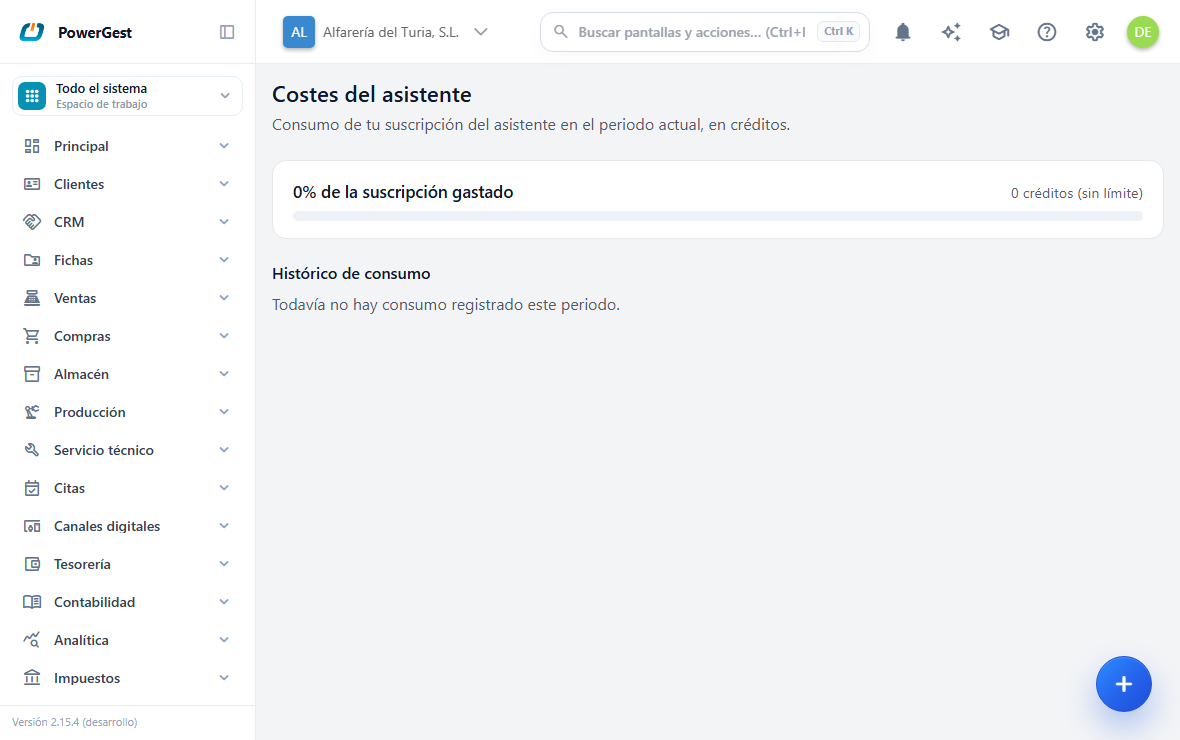
The Assistant costs screen shows how many subscription credits your company has spent in the period and how many are left. You get there through Settings → Assistant → Assistant costs.
What do I need before I start?
Permission for the screen. If it doesn’t appear in Settings, ask whoever administers the ERP.
The data is for the company you are working in. If you run several, change company to see another one’s.
What does the screen show me?
At the top, a usage bar for the current period, with two readings:
- N% of the subscription used, on the left.
- X / Y credits on the right, or X credits (no limit) if your plan has no cap.
Below that, Usage by function: what the period’s credits have gone on, from most to least. For example Assistant, Professional analysis, Email, CRM or Assistant (site node). Each row has its Credits and how many Charges it adds up to.
And at the end, Usage history, with one row per charge: Date, Function, Credits and Overage (Yes or —). The oldest charges may show as No detail: they were made before the program stored the function.
And nothing else. You won’t see names of artificial intelligence models, providers or prices in euros: the screen’s unit is the credit, which is what your company subscribes to.
If nothing has been spent yet, the screen says ‘No usage recorded yet this period.’
What uses credits and what doesn’t?
Everything done by the artificial intelligence we provide with the subscription uses credits, and not just the chat:
- The assistant’s answers. The normal ones go through the basic engine and use little.
- The professional analysis: the quality answer you ask for with Go ahead, and the in-depth review of the knowledge guide. It is what uses the most, and it always says so first.
- The artificial intelligence in the rest of the program: drafting, summarising and classifying emails; the CRM’s suggestions and summaries; reading invoices when importing them; translating the online store; the summary of a task schedule; the guide review, and suggesting subjects or drafting texts in mailing.
- The intent suggestions in SEO: 2 credits for each suggestion produced.
- If you have an AI node at your site, the complex questions it passes to the advanced model we provide with the subscription. They show as Assistant (site node).
What doesn’t use credits is data queries that don’t call the artificial intelligence, or the actions you confirm. And if your company has its own AI engine installed, whatever that engine deals with doesn’t use credits either: your own installation pays for it. The same goes for the site’s AI node when it answers with its own model.
The period is the calendar month. When a new month starts, the counter goes back to zero.
What happens if we go over the budget?
It depends on the plan, and the screen says so with one of these two notices:
- ‘You have exceeded the period budget: additional usage is invoiced as overage.’ The assistant keeps working and the excess is invoiced separately.
- ‘You have exceeded the period budget. Upgrade your plan to keep using the advanced level.’ The professional analysis stops being offered until the next period. The normal assistant keeps answering.
There is also a different, stricter limit, which your own company sets: a monthly budget in euros for all the ERP’s artificial intelligence, not just the chat. When it runs out, the program warns first and, after a margin, cuts off the AI service everywhere until the next month. That warning comes inside the conversation, not on this screen.
If something goes wrong
| What you see | What has happened | What to do |
|---|---|---|
| ‘Your active company could not be resolved.’ | The session has no company | Select a company at the top and reload |
| ‘The assistant usage could not be loaded.’ | Momentary failure reading the data | Reload; if it persists, tell support |
| X credits (no limit) | Your plan has no budget set | It is normal; there is nothing to correct |
| The spending doesn’t match the estimate on the card | The card shows an estimate; the charge is the real usage | Compare several entries in the history |
| A negative charge in the history | It is an adjustment or a compensation | It is shown on purpose, so that it adds up |
See also: Ask for a professional analysis · Choose the thinking level
More about Assistant
- Can I attach a CSV or a spreadsheet for the assistant?
- Can I show the assistant an image or a PDF?
- How do I teach the assistant about my company?
- How do I add several items at once with the assistant?
- How do I choose how much effort the assistant makes?
- Working with the assistant
- How do I ask for a professional analysis and what does it cost me?
- How do I ask the assistant to do something in the ERP?
- How do I put the assistant on my website?
- How do I ask the assistant something?
- Test the assistant and find out what it costs
- Can I tell the assistant to stop asking me about the professional analysis?