How do I review the transactions that come in from the bank?
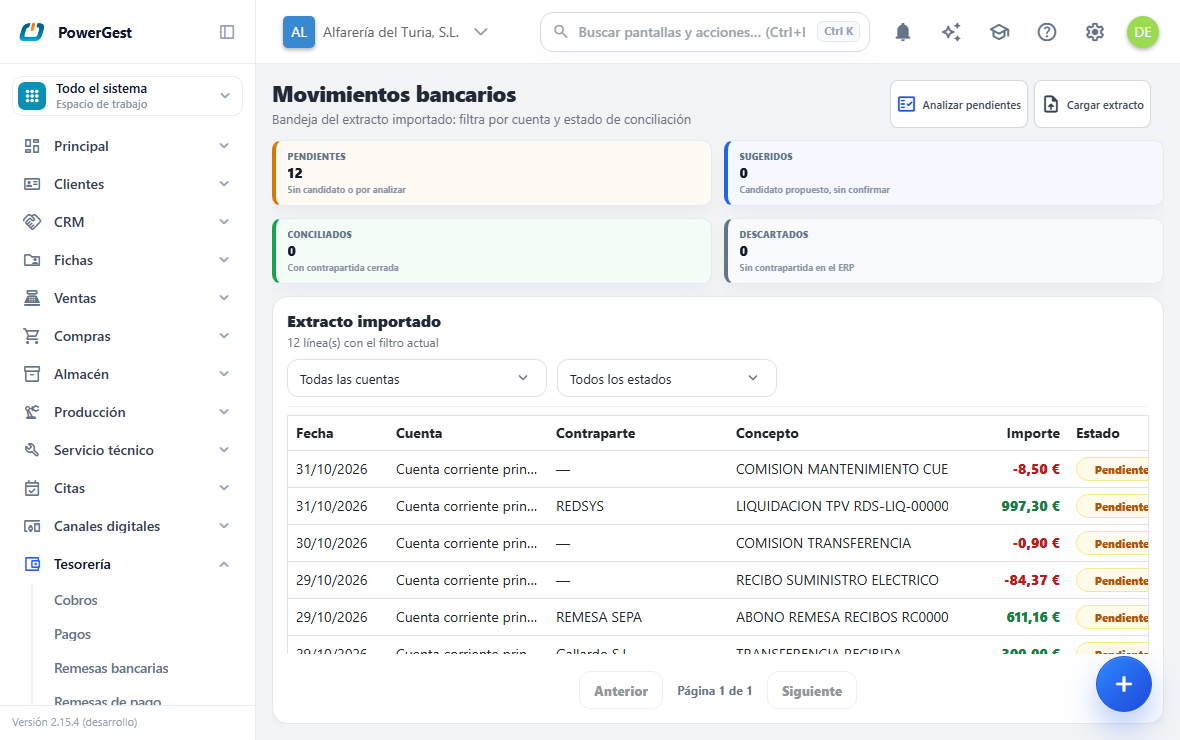
The Bank transactions screen is the imported statement inbox. It shows, line by line, what the bank has posted to your connected accounts and what status each line is in with regard to reconciliation. Here you look and load the statement; whatever needs resolving is resolved in Bank reconciliation.
What do I need before I start?
You need at least one Active bank connection with its accounts paired with treasury accounts. The ERP brings the transactions in on its own, without you having to import anything.
For the months the connection does not reach, or for an account that is not connected, you can load the statement from a file with the Load statement button.
If the inbox is empty, the problem is in the connection, not here.
How do I do it?
- Go to Treasury and click Bank transactions.
- At the top you see four counters: Pending, Suggested, Reconciled and Discarded.
- In Imported bank statement, narrow down what you see with the two drop-downs. The first one chooses the account (All accounts by default). The second one chooses the status (All statuses by default).
- Go through the list with Previous and Next.
- Click a line to open it on the Bank reconciliation screen and resolve it there.
What does each status mean?
Each statement line has a status that says how far its reconciliation has got.
Pending is an unresolved line. Either it hasn’t been analysed yet, or the ERP didn’t find a clear counterpart for it.
Suggested means that the ERP has found a likely counterpart but doesn’t take it as good: it waits for a person to confirm it. It happens when there are several equally good candidates, or when the amount doesn’t match to the cent.
Reconciled is a line closed against its counterpart. The Counterpart column says against what: a treasury transaction, a batch or a settlement.
Discarded is a line that someone set aside on purpose because it has no counterpart in the ERP, such as a bank fee or a transfer between your own accounts. The reason is saved.
What does the Analyse pending button do?
Analyse pending runs the automatic matching on the Pending lines of the account you have filtered. If you don’t filter any, it analyses all the paired accounts.
The ERP compares each line with what you have already recorded: unreconciled cash and bank transactions, batches issued through that account, the open items of instalments and the payment gateway settlements.
When the result is unambiguous, the line is left Reconciled on its own. When there is doubt, it is left Suggested and waits for confirmation. When it finishes, a summary appears with how many lines have been analysed and how each group has ended up.
There is one case that is never closed on its own: when the line looks like the receipt of some instalments that hadn’t been recorded yet. Accepting that issues a batch, that is, it moves money, so a person always confirms it from Bank reconciliation.
What does it mean when a settlement appears in the Counterpart column?
An aggregated deposit from a payment gateway —Redsys, Stripe, PayPal, GoCardless— reaches the bank as a single line for the net amount of many operations. The ERP recognises it and creates a settlement so it can be broken down later.
In the inbox, that line shows as Reconciled against a settlement. That only means the statement line already has an owner. Balancing operation by operation is a separate step, on the Bank reconciliation screen.
If something goes wrong
| What you see | What has happened | What to do |
|---|---|---|
| The inbox is empty | There is no active bank connection, or nothing has been downloaded yet | Check the status of the connection in Bank connections |
| There are transactions but Analyse pending doesn’t reconcile any | The bank account isn’t paired with a treasury account | Pair the account in Bank connections |
| ‘Connected account … does not exist, is not active or is not mapped to a treasury account.’ | The filter points to an unpaired account | Remove the filter or pair that account |
| Many lines are left Suggested instead of being reconciled | There are several candidates with the same score, or the amount doesn’t match exactly | Confirm them one by one in Bank reconciliation |
| ‘Another user changed the transactions during the analysis. Run the analysis again.’ | Two people analysed at the same time | Click Analyse pending again |
| A line that was already reconciled shows up again | Someone undid it from Bank reconciliation | Check the line’s audit trail: it records who resolved it and when |
See also: Connect my bank · Load the statement from a file · Reconcile the bank transactions
More about Banks
- How do I use my spreadsheets to reconcile the bank?
- How do I load the bank statement from a file?
- How do I reconcile the bank transactions?
- How do I connect my bank to the ERP?
- How do I balance a POS or payment gateway settlement?
- How do I set up my company’s access to Enable Banking?
- Connecting the bank and reconciling the statement
- How do I reconcile the bank month by month?
- How do I review my store’s POS remittances?