How do I close the till and do the cash count?
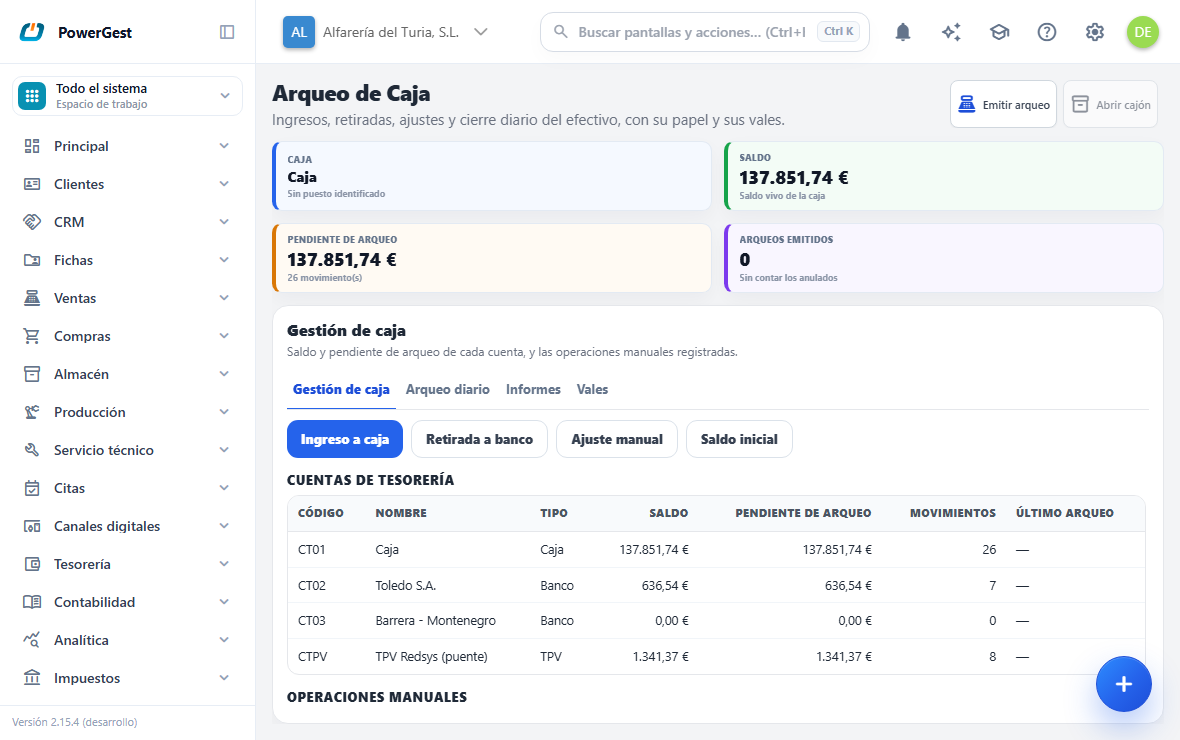
The cash count is the till closing: you count the cash, the ERP compares it with what there should be, the difference is recorded, and you can take the surplus to the bank, leaving a float for tomorrow. All from the Cash count screen in the management menu.
What do I need before I start?
You need at least one active cash account (the same one the POS collects into). If the workstation has its local agent connected, the screen knows which is your till and the cash count receipt comes out on the thermal printer; without the agent, everything works the same and the cash count comes out as a PDF.
The till isn’t opened or closed in order to sell: the POS takes payment whether or not there are cash counts. A cash count is a cut-off — everything collected since the previous closing goes into the next cash count.
How do I put money into or take money out of the till?
On the Cash management tab you have the four operations, each with its own window:
- Cash deposit: you bring money from a bank to a till (the morning change).
- Withdrawal to bank: you take cash from the till to the bank.
- Manual adjustment: you correct the till without a transfer; a negative amount is a shortfall.
- Opening balance: the amount a newly created account starts with. It is only allowed on accounts with no movements; if the account has already had movements, use Manual adjustment.
Each operation is numbered and has its journal entry, and appears in the Manual operations list, from where you can Void it as long as no cash count has captured it.
How do I issue the cash count?
On the Daily cash count tab:
- Choose the Till and the Cut-off date (today, normally) and click Preview.
- The screen shows you the period: Previous balance, Incoming, Outgoing and the Calculated balance, which is what there should be in the drawer.
- Count the cash and type it in Count (cash counted). The Imbalance is calculated automatically.
- In Float for tomorrow type what you leave in the drawer. If it is less than the count, choose the Destination bank for the withdrawal: the difference is transferred to the bank in the same closing.
- Click Issue cash count. The receipt comes out on the thermal printer (or the PDF) and the till is balanced: its balance becomes exactly the float you have left.
What happens with the Imbalance?
If what was counted doesn’t match what was calculated, the Imbalance doesn’t stay as a warning: the closing records the difference as an adjustment movement with its journal entry, surplus or shortfall. It isn’t hidden; it stays in the cash count, in the report and in the accounts.
This is on purpose, and it is what makes the till useful: after the closing the till’s Balance tells the truth again, instead of dragging along an error nobody knows the origin of.
What happens with a sale that arrives late?
Each cash count captures the movements that no earlier cash count took. If a customer receipt is recorded after closing —even if it is dated yesterday—, it goes into the next cash count, and the report flags it (‘includes N movements from the previous period’). Yesterday’s cash count wasn’t wrong: the money wasn’t in the till when it was counted.
Can I reprint or void a cash count?
On the Reports tab you have all the cash counts issued. Reprint always gives the same paper, even if the till has kept moving: the figures were frozen at closing. The Detailed PDF adds the list of movements for the period.
Void is only offered for the latest cash count of each till (the earlier ones are closed history). When you void it, its movements become outstanding again and the Imbalance adjustment is undone with its journal entry.
What isn’t undone on its own is the Withdrawal to bank: that money really moved and the program isn’t going to invent a movement back. If appropriate, void the transfer separately from Manual operations.
If something goes wrong
| What you see | What has happened | What to do |
|---|---|---|
| ‘The account already has movements: record a cash adjustment, not an opening balance.’ | Opening balance on an account already in use | Use Manual adjustment |
| ‘Leaving a smaller float than the amount counted requires a destination account for the withdrawal.’ | Float smaller than the count with no bank chosen | Choose the Destination bank for the withdrawal |
| ‘The float cannot exceed the amount counted.’ | You have typed a bigger float than the cash counted | Check the count or the float |
| ‘Batch … is sealed by a cash count: void the cash count first.’ | You are trying to void an operation already captured by a closing | Void the cash count first (if it is the latest one) |
| ‘Only the latest cash count of the cash account can be voided…’ | You are trying to void an old cash count | Earlier cash counts aren’t touched |
| The Open cash drawer button is greyed out | The workstation has no local agent connected | The cash count works the same; the drawer is opened by hand |
See also: Take payment for a sale at the POS · Pay for a receipt with a voucher or an advance payment
More about POS
- How do I park a sale and resume it later?
- How do I take payment for a sale at the POS?
- How do I set up the POS?
- How do I view, reprint or return a receipt that has already been paid?
- How do I issue an invoice or a delivery note from the POS?
- Selling at the counter with the POS
- How do I set up the touch POS button board?
- How do I pay for a receipt with a customer’s voucher or advance payment?
- How do customer points work?
- How do I sell with the touch POS?